 DiscipleMakers HQ
You can listen to music from:
- Your own device (smartphone/tablet/laptop running iTunes, Spotify, Pandora, etc)
- An app running on a set-top box in the room
- An audio CD
Instructions
Your Own Device
- Follow the instructions to connect your smartphone/tablet or connect your laptop.
- Do you wish you could just plug an audio cable into the headphone jack of your device? You can! Just follow the Connect your Laptop - Wired instructions (even if you're using a smartphone and not a laptop) and use the VGA to HDMI adapter. Ignore the VGA cable and just use the audio cable. Score!
App Running on a Set-Top Box
- Pick the box that you're most comfortable with and use its apps and controllers as you normally would. Want another app installed? Just ask!
Audio CD
- Mostly follow the Play a Disc instructions to play your CD on the Xbox One, with a couple exceptions:
- You'll use the Audio CD Player app instead of the Blu-Ray Player, but it should load automatically when you insert an audio CD.
- The Xbox Media Remote doesn't really work with the Audio CD Player app, so use a game controller instead. Weird!
Other Instructions
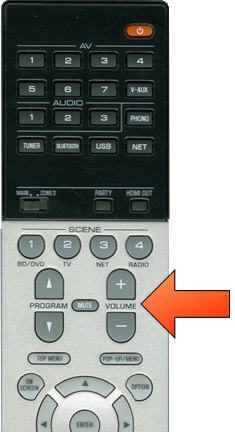
- Adjust the sound volume as needed using the Receiver remote (switch must be on Main).
You can display the same thing on both screens, or display something else on the other screen.
You can change the sound mode in order to produce a more roomy or realistic effect.
When you're done, turn off the receiver and TV displays.